Updated Barcode Manager
 press
pressAddition of configuration item
Option to save scanned history
Barcode data scanned by the app is automatically saved in the app as reading history and can be viewed from the history screen.
By setting the newly added “History” option, you can omit saving the history. In some business applications, it is not necessary to save the reading history, but it may be desirable to improve the performance of continuous reading. This option has been added to address these situations.
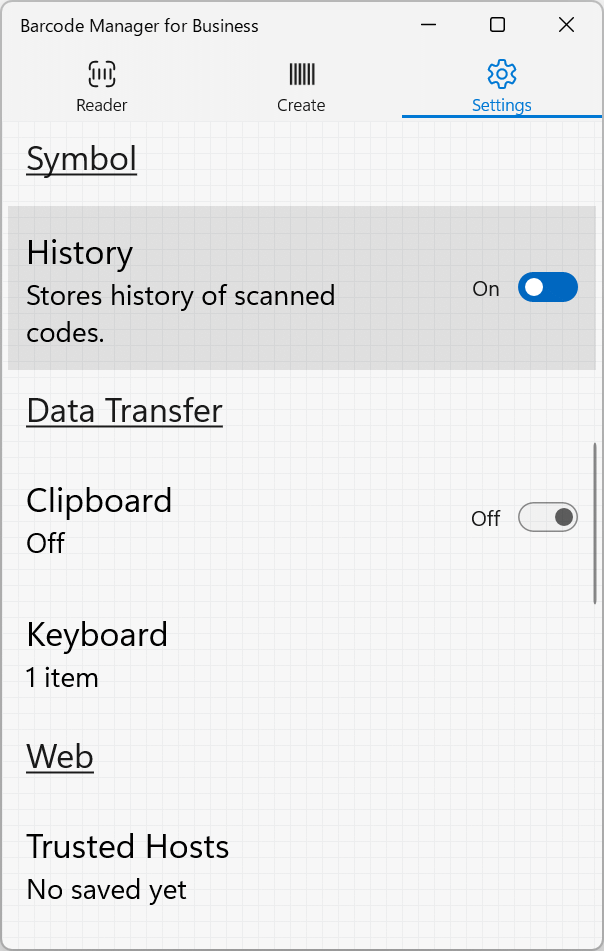
The option can be set in “Settings” – “Symbol” – “History”. The default is “On” (save history).
This feature is available for the following products:
Target app version
| Barcode Manager for Windows | - |
| Barcode Manager for Education | - |
| Barcode Manager Pro for Windows | 1.6.3 / 2.3.3 |
| Barcode Manager for Business | 1.6.3 / 2.3.3 |